Commands
KubeJS TFC adds several commands for debugging TFC-related parts of scripts and information. They all require a permission level of 3 or higher to use
There are commands for:
- Listing the contents of a data type
- Describing the contents of a data entry
- Searching for the applicable data on an item/fluid/block/entity type
- Printing the TFC world settings of the current level
- Printing the TFC rock settings of the current level
- Printing the TFC
ChunkDatain the player’s current chunk - ‘Solving’ a tree template for use in TFC tree structures & configured features
- Inspecting
Noise2Dobjects - Inspecting
Noise3Dobjects - Reloading KubeJS TFC’s config
List IDs
Prints a list of data entries handled by a data type. Each entry can be clicked to describe it. The entries are printed in alphabetical order in a paginated view. The gold arrows below the list of entries can be used to see the previous and next pages
The command has the following form:
/kubejs_tfc list_ids <data_type> [<page>]
<data_type>: The data type to list entries of. All data types will be suggested[<page>]: A positive integer, the page to list. Will be clamped to available pages of results. Optional
An example: /kubejs_tfc list_ids tfc:fuel 2
Describe
Prints an overview of the data contained in a data entry.
The command has the following form:
/kubejs_tfc describe <data_type> <id>
<data_type>: The data type to retrieve the entry from. All data types will be suggested<id>: The id of the entry to describe. The ids of all entries handled by the data type will be suggested
An example: /kubejs_tfc describe tfc:fuel tfc:coal
Search
Prints a list of data entries which apply to a registry entry. Each entry can be clicked to describe it
The command has the following form:
/kubejs_tfc search <data_type> <value>
<data_type>: The data type to retrieve the list from. All searchable data types will be suggested<value>: The registry id of the item/block/fluid/entity type that has a data entry in the data type. All objects with an associated data entry will be suggested
Examples:
/kubejs_tfc search tfc:fluid_heat tfc:metal/copper/kubejs_tfc search tfc:entity_damage_resistance minecraft:creeper/kubejs_tfc search tfc:fertilizer tfc:powder/wood_ash
Print World Settings
Prints the TFC Settings of the current level if the chunk generator is TFC-like1
The command has the following form:
/kubejs_tfc print_world_settings
The rock layer settings within the TFC settings will not be printed as they have a tendency to fill the entire message history. Instead, ~~~ will be printed in its place; this can be clicked to print them separately
Print Rock Settings
Prints the rock layer settings of the current level if the chunk generator is TFC-like1
The command has the following form:
/kubejs_tfc print_rock_settings
Print Chunk Data
Prints the server Chunkdata of the current chunk in an ostensibly readable format. Only the infomration available will be printed. That is to say, if the status is EMPTY, CLIENT (somehow), or INVALID no additional information will be printed; and the surface and aquifer heights will only be printed if the status is FULL
The command has the following form:
/kubejs_tfc print_chunk_data
Tree Solver
Converts one or more in-world tree templates into trees which properly interact with TFC’s logging mechanic, primarily intended for easily making tree structures for forests
This command replaces template blocks in-world with the selected log and leaves blocks in the correct block state. There are three template blocks:
minecraft:light_blue_stained_glass: Marks a root position, or the ‘origin’ of a tree. This is the only block required to be within the scan area. Must have aminecraft:brown_stained_glassblock immediately above it; and for a<trunk_size>of2, it should be in a two by two patternminecraft:brown_stained_glass: Marks a log position. The solver climbs upwards from the root marker(s) breadth-first along this block. The solver will connect to any log marker in the 3 by 3 by 3 area centered at the current position, though the lowest order2 connection that is valid will be usedminecraft:green_stained_glass: Marks a leaf position. Markers beyond the decay range of the leaves block will not be replaced
All root positions within the scan area will be solved and converted into trees, though the command will fail to run if it encounters a root that does not have the same size as the <trunk_size> argument or a root marker does not have a log marker above it
The command has the following form:
/kubejs_tfc tree_solver <trunk_size> <log_block> <leaves_block> <from> <to>
<trunk_size>: An integer, either1or2, the trunk size of the templates to solve<log_block>: A block. Is limited to and will only suggest blocks with TFC’s branch direction property. See the log block type for custom logs<leaves_block>: A block. Is limited to and will only suggest blocks TFC leaves blocks. See the leaves block type for custom leaves<from>: A block position, one corner of the scan area. Supports relative positions<to>: A block position, the other corner of the scan area. Supports relative positions
As an example
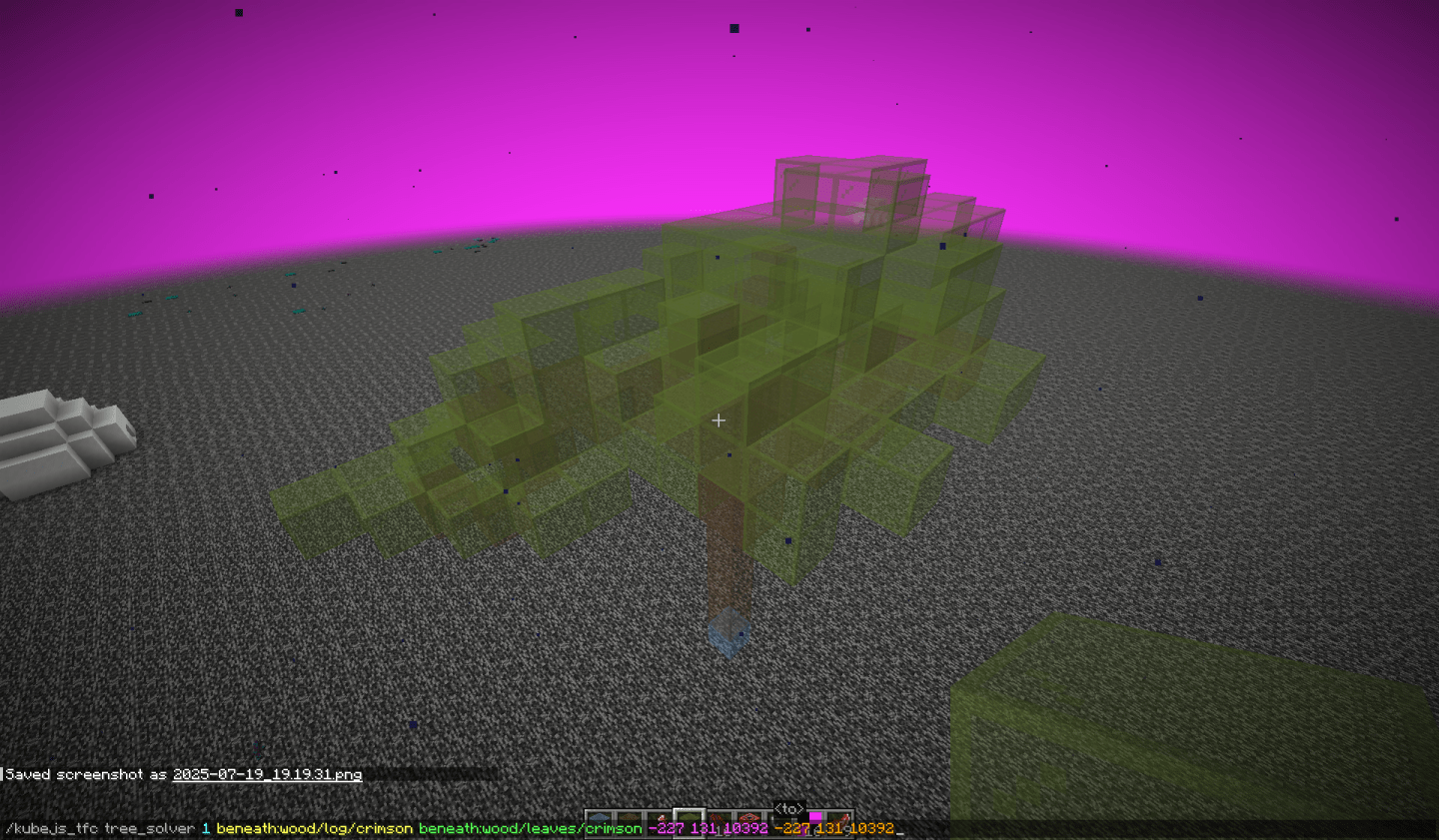
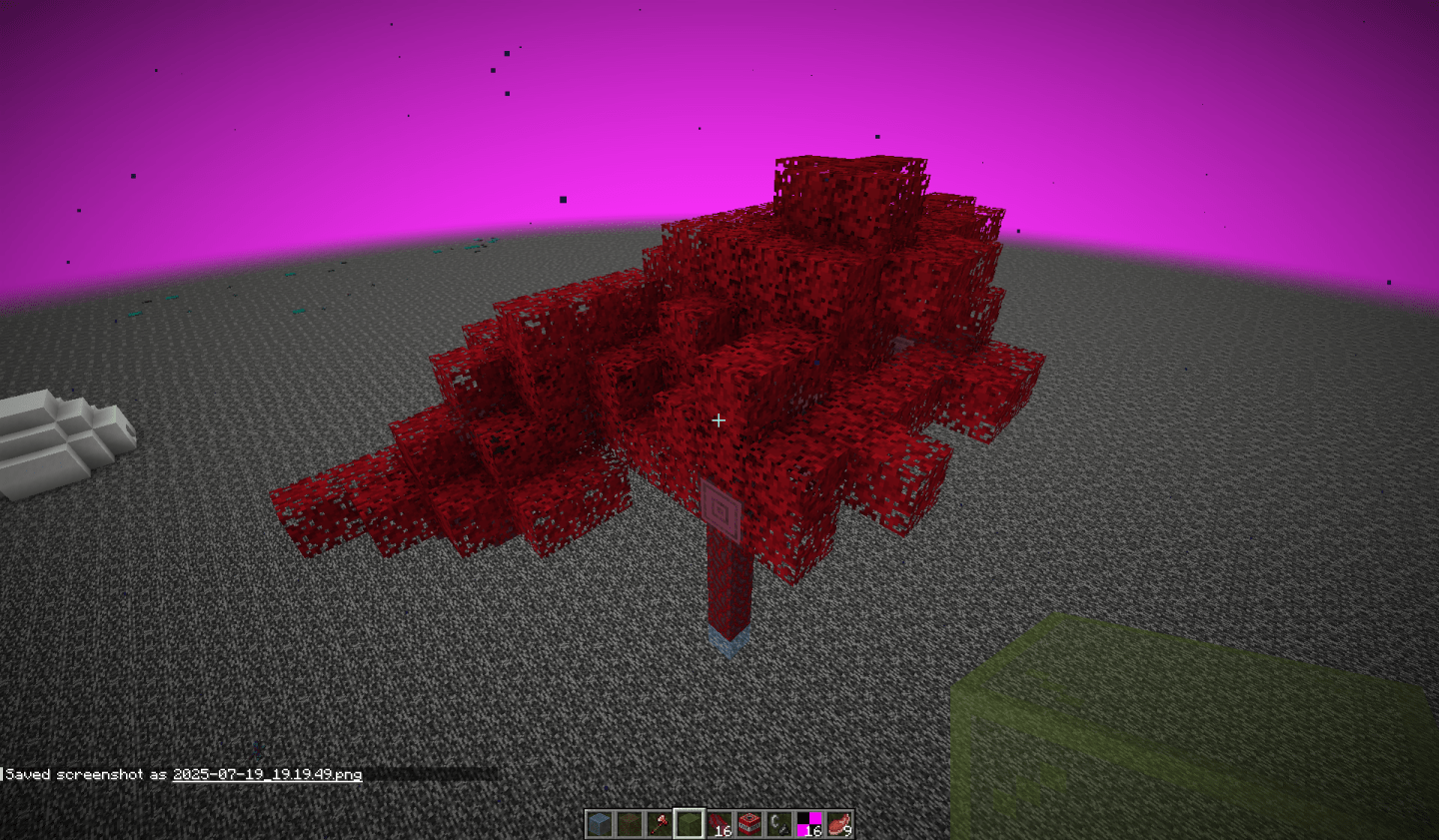
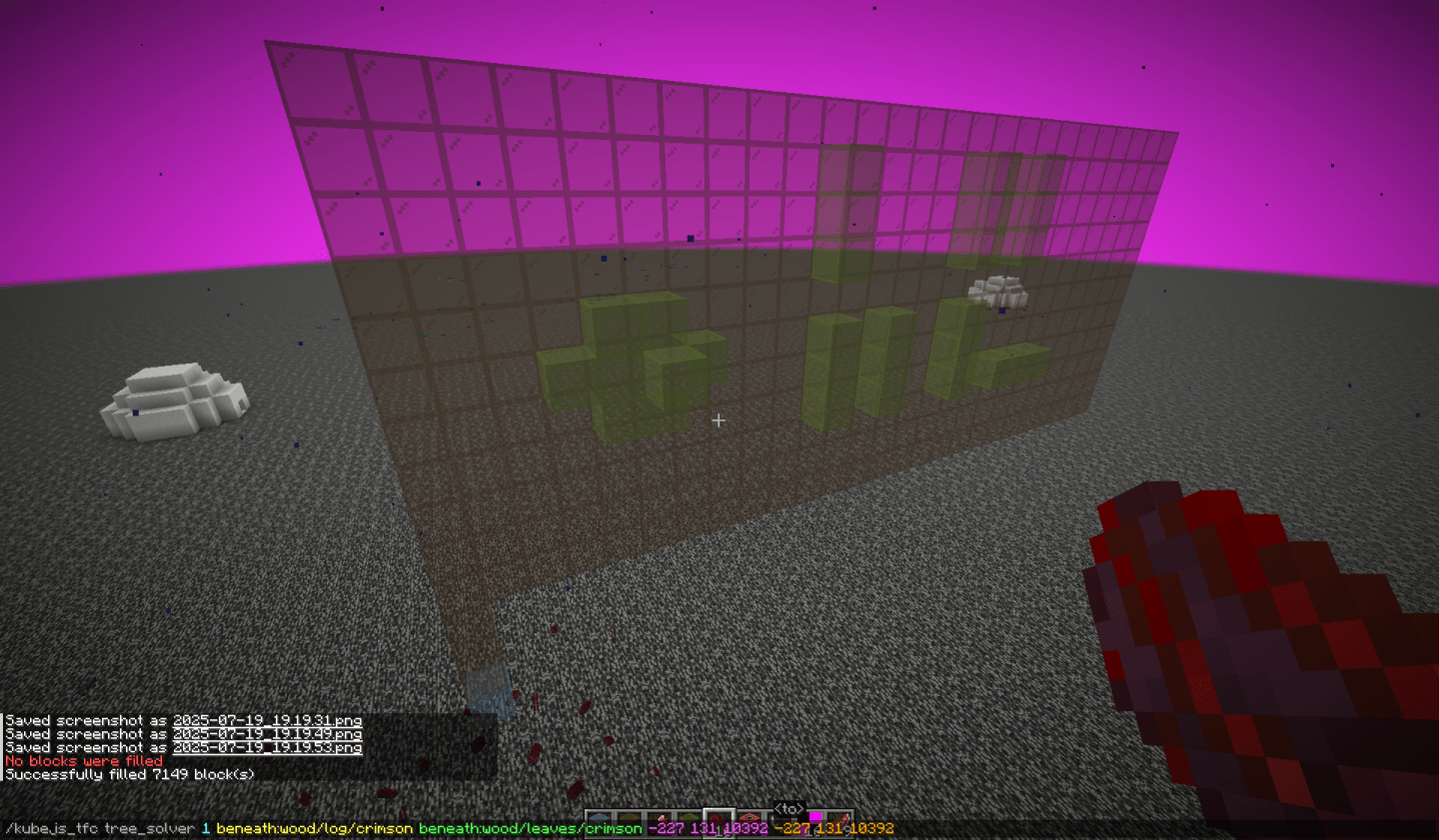
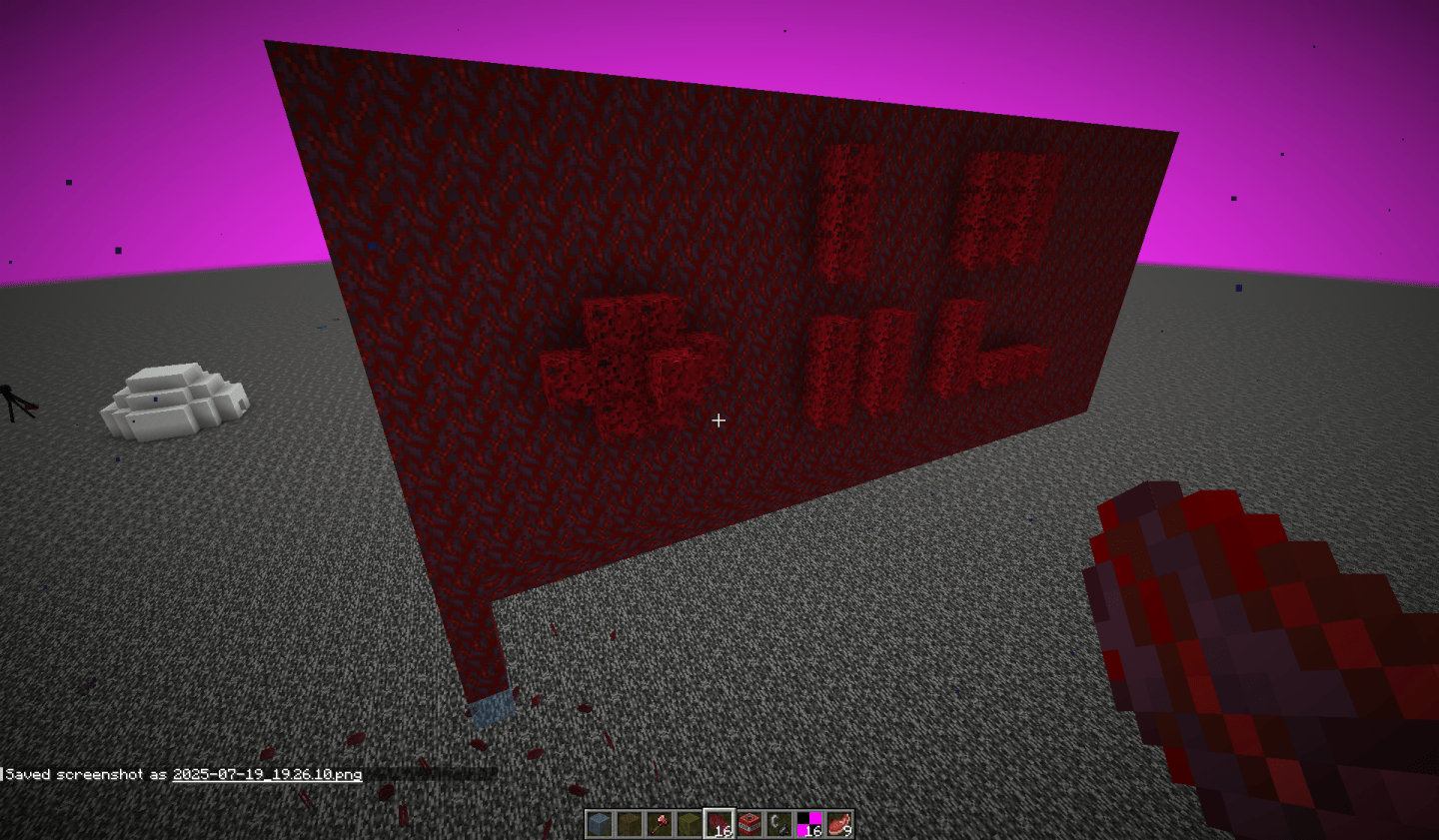
It can also handle rather strange forms
Inspect 2D Noise
Displays the selected registered Noise2D in-world with the given parameters. In order to inspect a noise, it must be registered
The command has the following form:
/kubejs_tfc inspect_2d_noise <from> <to> <input_range> <output_range> <noise>
<from>: A block position, one corner of the display area. Supports relative positions<to>: A block position, the other corner of the display area. Supports relative positions<input_range>: A range3, the range which the noise will be samples over for the x and z axes<output_range>: A range3, the expected range for output values of the noise<noise>: The name of the noise to inspect
This command fills space in-world by sampling the noise over the <input_range> in the largest x-z squarebounded by the <from> and <to> positions’ x and z coordinates. The value of the noise at the sampled position will then be mapped to a y-position within the bounds of <from> and <to> and white stained glass will be placed at that position. If the value is beyond beyond the bounds of <output_range>, the red stained glass will be placed at the edge of the y-boundaries instead. If the value is infinite, then lime stained glass will be placed instead. If the value is Nan, then purple stained glass will be placed instead.
Inspect 3D Noise
Displays the selected registered Noise3D in-world with the given parameters. In order to inspect a noise, it must be registered
The command has the following form:
/kubejs_tfc inspect_3d_noise <from> <to> <input_range> <output_range> <noise> [<y_value>]
<from>: A block position, one corner of the display area. Supports relative positions<to>: A block position, the other corner of the display area. Supports relative positions<input_range>: A range3, the range which the noise will be sampled over for the x, y, and z axes<output_range>: A range3, the expected range for output values of the noise<noise>: The name of the noise to inspect[<y_value>]: A number. If present, the 3D noise is treated as a 2D noise by only sampling it at the given y-value and displayed in-world as if it were a 2D noise
This command fills space in-world by sampling the noise over the <input_range> in the largest x-y-z cube bounded by the <from> and <to> positions. The value of the noise at the sampled position will then be mapped onto a gradient of stained glass, as described below, and the block will be placed at that position. If the value is beyond the bounds of <output_range>, then the position will be filled with air
The gradient, from lowest to highest, is represented as:
- ▮ White Stained Glass
- ▮ Pink Stained Glass
- ▮ Red Stained Glass
- ▮ Orange Stained Glass
- ▮ Yellow Stained Glass
- ▮ Lime Stained Glass
- ▮ Light Blue Stained Glass
- ▮ Light Gray Stained Glass
- ▮ Gray Stained Glass
- ▮ Cyan Stained Glass
- ▮ Green Stained Glass
- ▮ Blue Stained Glass
- ▮ Magenta Stained Glass
- ▮ Purple Stained Glass
- ▮ Brown Stained Glass
- ▮ Black Stained Glass
Reload KubeJS TFC Config
Reloads and prints the KubeJS TFC config
The command has the following form:
/kubejs_tfc reload_config